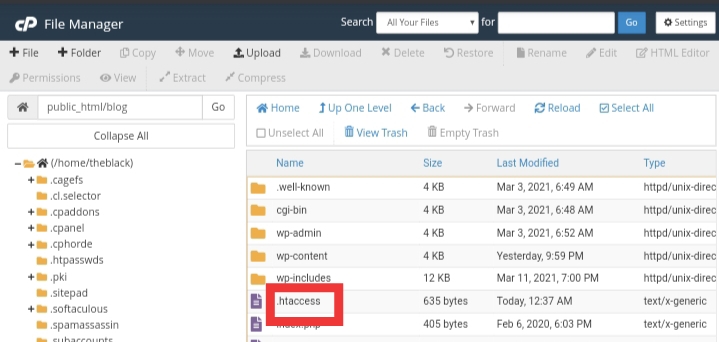
ok disini saya akan memberi tutorial cara menampilkan file .htaccess di file manager cpanel
Ok kenapa kita harus menampilkan file .htaccess karena file .htaccess sangatlah berguna untuk membantu kita mengedit dan memperbaiki website
File .htaccess umumnya pada cpanel baru biasanya tersembunyi dan untuk menampakkan ya kita harus melakukan beberapa hal
Ok tunggu apa lagi langsung saja kita praktekkan
Langkah pertama buka file manager di cpanel anda
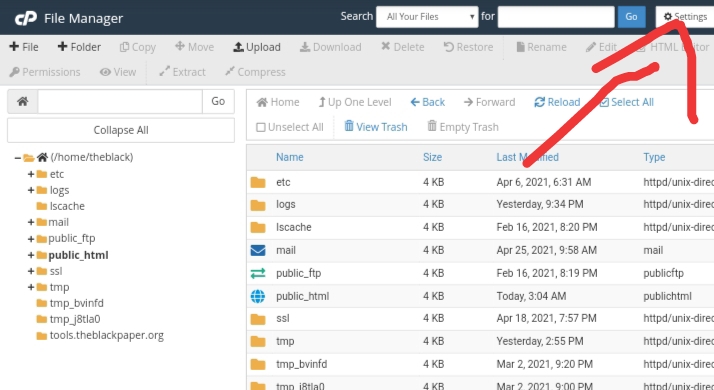
Setelah dibuka silahkan ikuti langkah langkah ini pertama pergi ke setting
Lalu setelah itu klik centang pada show hidden file
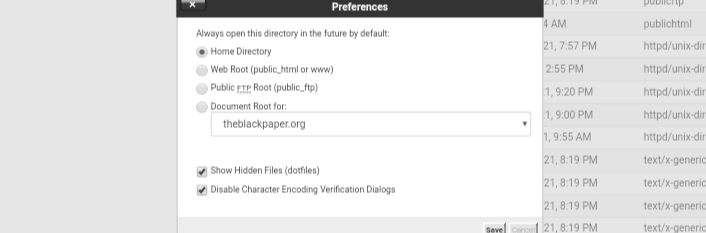
Dan klik save dan boom file .htaccess langsung muncul seketika



tes
Alright, I’ve been messing around on DirBetCasino and so far, it’s pretty solid. Good game selection and the payouts seem legit. Give dirbetcasino a look if you need a new place to spin!
2abet1 is alright, nothin’ crazy, but I won a little bit. Worth a look if you’re bored Give 2abet1 a try 2abet1.
Understanding the necessity of viewing hidden configuration files like .htaccess is vital. It highlights that robust web architecture relies heavily on understanding these underlying system rules. Mastering these details is crucial for maintaining secure and optimized digital environments, whether it’s managing a site or accessing reliable platforms like JL98 link.
Understanding hidden files like .htaccess is fundamental to web architecture and security. These files control the backend logic, much like optimizing the operational flow of a complex service. Proper management is key to stability, whether you’re configuring a server or building out a robust platform like ph29 club. Excellent foundational knowledge always pays off!
Solid math on RTP here; I appreciate the focus on player protection via Marathon Gameplay link. Smart moves for PH gamers seeking legit platforms with verified odds and secure access points today.
The structural depth of these platforms warrants a technical look. Analyzing the mechanics behind the live dealer experience, like what Hyph777 offers, is key. Check the hyph777 login for deeper insights.
This is a crucial reminder about web fundamentals. Understanding hidden files like .htaccess is key to security and performance. A stable digital infrastructure, whether it’s a website or a mobile gaming experience, requires this foundational attention. For seamless access, check out the 711ph app download apk.
As someone who plays regularly I can honestly say this platform respects its users the most. The support team responds in minutes and the banking options cover everything I need. It has quickly become my go to place for quality gaming. pk777betonlinecasino
Just tried BigBunny Casino today; the slots are slick! For a smooth entry, head to bigbunny casino login and verify your ID quickly. Great vibe for weekend gaming sessions in PH!
The mobile app runs so smoothly and I never had to deal with crashes during live matches. Quick deposits and withdrawals make it easy to stay in the action. They also offer great daily tips that actually help me plan my bets better. Truly a reliable companion for sports fans wpcntapps
As someone who enjoys a lively gaming atmosphere, I found this spot to be exactly what I needed. The games are vibrant and the promotions keep things fresh every week. I really appreciate how smoothly the account verification went and how quickly my wins landed in my wallet. Highly recommend it to anyone looking for a solid pick. mexokcasino
Analyzing the structure, the educational focus on safe entry points is key. It’s less about the immediate play and more about the process. Check out winph vip login for deeper insights.